Important Notes and Notices
Notice
[Important] Notice of Service Suspension due to System Maintenance (September 2, 4, 11, 15 and 21, 2026)
Thank you for using our Certificate Issuance Service.
Please be advised that our services will be temporarily suspended for scheduled system maintenance as outlined below.
During this period, both the certificate issuance service and on-campus certificate issuing machines will be unavailable.
We apologize for any inconvenience this may cause and appreciate your understanding and cooperation.
・Maintenance Schedule
September 2, 2026 (Wed) 0:00–10:00 (JST)
September 4, 2026 (Fri) 0:00–10:00 (JST)
September 11, 2026 (Fri) 0:00–10:00 (JST)
September 15, 2026 (Tue) 0:00–11:00 (JST)
September 21, 2026 (Mon) 0:00–10:00 (JST)
* Please note that the end time may vary depending on the progress of the work.
・Status of Each Feature During Maintenance
| Features |
Availability | Notes |
|---|---|---|
| Login to the service | Not available | |
| Registration procedure for former students | Not available |
|
| Application for issuance of certificates | Not available |
|
| Application for payment of various fees | Not available |
|
| Payment for previously applied certificates and fees | Available |
However, the notification of the number required for certificate printing will be sent after the maintenance is completed. |
| Printing of paid certificates at on-campus machines | Not available |
The on-campus issuing machines will also be suspended during this period. This period also coincides with the Summer Recess shutdown. |
| Printing of paid certificates at convenience stores | Available |
|
| Download of paid certificates via Online System |
Not available |
Already-downloaded PDF files can be viewed; however, an error will occur in the electronic certificate. |
Issuance of Certificates for the End of the 2026 Spring Semester and the Start of the 2026 Fall Semester(Posted on August 26, 2026)
When requesting certificate issuance at the end of a semester or the beginning of a new semester, please be sure to consider the content that can be certified and the periods during which certificates cannot be issued before submitting your application.
* Please also refer to “List of Certificates Issued by Doshisha University” for information on the eligibility requirements and main items certified for each type of certificate.
* A certificate certifies information as of the date of issuance. Therefore, any request for refunds or exchanges of certificates due to subsequent changes in information (including name changes, cancellation of enrollment status changes, and academic evaluation changes) cannot be accommodated.
* If you are asked by a company to submit certificates during a period when certificates cannot be issued—for example, for job-hunting purposes—please refer to the Career Center’s “Certificates and Resumes” page.
Certificate for Student Discount Tickets "Gaku-Wari"
“Gaku-Wari” is issued to current students (excluding certain students such as non-degree students and auditors).
For students who reach the end of their standard period of study at the end of the current semester, as well as repeating students who complete their academic year at the end of the current semester, the validity period will be until the end of that semester. If you will remain enrolled in the following semester, you may apply for “Gaku-Wari” for the next semester starting at 10:00 on the first day of that semester.
* For those scheduled to graduate or complete their program at the end of the relevant semester, please note that you will no longer be able to apply for “Gaku-Wari” from the day after your graduation / completion date. Please pay careful attention to both the graduation / completion date stated on your grade report for the relevant semester and the operating hours of the on‑campus certificate issuing machines. In addition, please make sure to comply with the rules set forth by JR companies when using the “Gaku-Wari”.
Official Transcript
An Official Transcript certifies the courses that have been completed at the time of application.
An Official Transcript that lists the courses completed in each semester can be requested after the grade notification date for each respective semester, as shown below.
| Category | Affiliations Other Than Those Listed on the Right |
Law School | Graduate School of Business |
Center for Global Education and Japanese Studies |
|---|---|---|---|---|
| Application period for transcripts listing courses completed up to the 2025 Fall Semester |
Fri, March 13, 2026, 10:00 – Thu, September 10, 2026, 23:59 | Fri, March 13, 2026, 10:00 – Thu, September 10, 2026, 23:59 | Fri, March 13, 2026, 10:00 – Tue, September 1, 2026, 23:59 | Fri, March 13, 2026, 10:00 – Thu, September 3, 2026, 23:59 |
| Application period for transcripts listing courses completed up to the 2026 Spring Semester |
Fri, September 11, 2026, 10:00 – Mon, March 8, 2027, 23:59 | Fri, September 11, 2026, 10:00 – Mon, March 8, 2027, 23:59 | Wed, September 2, 2026, 10:00 – Mon, March 8, 2027, 23:59 | Fri, September 4, 2026, 10:00 – Mon, March 8, 2027, 23:59 |
* For those who are expected to graduate or complete their program at the end of the relevant semester, certificates applied for while still enrolled will not include the date of graduation or conferment of degree.
* The same applies to the courses listed on the Certificate of Expected Completion of Minor / Educational Program.
Certificate of Expected Graduation / Expected Degree Conferment
A Certificate of Expected Graduation / Expected Degree Completion is issued to students who are expected to meet all graduation or completion requirements, contingent upon the successful completion of all courses currently in progress.
Please note that there are periods at the end of a semester or the beginning of a new semester — when registered courses are subject to change — during which you will not be able to apply for a Certificate of Expected Graduation / Expected Degree Completion.
| Category | Affiliations Other Than Those Listed on the Right |
Law School | Graduate School of Business |
Center for Global Education and Japanese Studies |
|---|---|---|---|---|
| Application period for certificates reflecting course registration status for the 2026 Spring Semester |
Wed, April 22, 2026, around 7:30 – Mon, September 14, 2026 | Thu, April 16, 2026, around 7:30 – Mon, September 14, 2026 | Mon, April 13, 2026, around 7:30 – Sun, September 13, 2026 | Not applicable |
| Period during which applications cannot be submitted |
Tue, September 15, 2026 – Tue, October 13, 2026 | Tue, September 15, 2026 – Sun, October 4, 2026 | Mon, September 14, 2026 – Fri, September 18, 2026 | Not applicable |
| Application period for certificates reflecting course registration status for the 2026 Fall Semester |
Wed, October 14, 2026, around 7:30 – Late March 2027 (tentative) | Mon, October 5, 2026, around 7:30 – Late March 2027 (tentative) | Sat, September 19, 2026, around 7:30 – Late March 2027 (tentative) | Not applicable |
* For those who are expected to graduate or complete their program at the end of the relevant semester, if the scheduled date of graduation or completion — as indicated on the grade report for that semester — falls before the end of the above application period, the application period will be limited up to that date.
* For those who are determined not to graduate or complete their program in the end‑of‑semester assessment, the Certificate of Expected Graduation / Expected Degree Completion for that semester will no longer be issued from the date of that notification onward.
* The same applies to the issuance of the Certificate of Expected Completion of Minor / Educational Program.
Certificate of Graduation / Degree Conferment
A Certificate of Graduation / Degree Conferment is issued to individuals who have completed all requirements and have officially graduated or had a degree conferred.
For those who are newly graduating or completing their program at the end of the relevant semester, one copy each in Japanese and English can be issued free of charge beginning the day following the scheduled date of graduation or completion, as indicated on the grade report for that semester.
For further details, please refer to “Issuance of Certificates Upon Graduation/Completion”.
* The same applies to the issuance of the Certificate of Completion of Minor / Educational Program.
Certificate of Health
A Certificate of Health is issued to individuals who have undergone the annual student health checkup for the relevant academic year. Please note that there are periods at the beginning of the academic year during which you will not be able to apply for a Certificate of Health.
| Category | Affiliations Other Than Those Listed on the Right |
Law School | Graduate School of Business |
Center for Global Education and Japanese Studies |
|---|---|---|---|---|
| Application period for certificates that include the 2026 health checkup results |
Mon, April 27, 2026, around 7:30 – Late March 2027 (tentative) | Mon, April 27, 2026, around 7:30 – Late March 2027 (tentative) | Mon, April 27, 2026, around 7:30 – Late March 2027 (tentative) | Mon, April 27, 2026, around 7:30 – Late March 2027 (tentative) |
* For those who are expected to graduate or complete their program at the end of the relevant semester, if the scheduled date of graduation or completion — as indicated on the grade report for that semester — falls before the end of the above application period, the application period will be limited up to that date.
[Important] Information on the Contents of Certificates for Applications Submitted on August 8, 2026 (Posted on August 6, 2026)
Due to the impact of the Next-Generation Infrastructure Information System Replacement (Japanese Text Only), data updates for the Certificate Issuance Service will be suspended on Saturday, August 8, 2026.
As described in "Timing of Data Updates", this service normally updates information on a daily basis, and the latest information is generally reflected by around 7:30 a.m. each day.
However, no data update will be performed on Saturday, August 8, 2026. Therefore, certificates applied for on August 8 will contain the information that was on record as of the early morning of Friday, August 7.
We kindly ask applicants to take note of this, particularly if there have been updates to the information appearing on their certificates, such as grade corrections, changes of name, or changes to the format of their name.
Please note that the contents of the certificate are finalized at the time of application, not at the time of payment. Therefore, applications submitted on or before Friday, August 7 and printed at a convenience store on Saturday, August 8 will not be affected.
In addition, all dates and times mentioned in this notice are stated in Japan Standard Time (JST).
Regarding Issuance via On-Campus Certificate Issuing Machines During the the Summer Recess (Posted on July 28, 2026)
The on-campus certificate issuing machines will be unavailable during the university's summer recess.
As stated here, the machines will be out of service from 17:00 on August 7 to 9:00 on August 17 (JST).
Even during the on-campus certificate issuing machines downtime, you can still apply for certificates from the “Issuance via On-campus Machines (Paper)”button in the Certificate Issuance Service. However, printing certificates will not be possible.
The printing deadline for certificates is 23:59 (JST) of the seventh day from the day following the day of the application. Please be sure to pay close attention to the printing deadline.
You can still issue certificates at a convenience store during the period mentioned above.
Regarding First-Time Application for Certificate Issuance Service and Issuance via Postal Mail During the Summer Recess (Posted on July 28, 2026)
The procedures will be handled as outlined below, so please complete them with sufficient time to spare.
Regarding First-Time Application for Certificate Issuance Service
Applications for first-time service use submitted on or after Tuesday, August 4 may be processed on or after Monday, August 17.
Regarding Issuance via Postal Mail
Applications for issuance via postal mail with payments confirmed on or after Wednesday, July 29 may be shipped on or after Monday, August 17.
* This does not apply if a separate issuance period has been specified.
[Starting Operation on December 1, 2025]Notice Regarding the Renewal of the Certificate Issuance System and Changes to Certificate Issuance Fees (Posted December 1, 2025)
A new certificate issuance service will go into operation on Monday, December 1, 2025, at 8:40 a.m. With the new service, certificates can be issued not only from on-campus certificate issuance machines but also at convenience stores nationwide (7-Eleven, FamilyMart, and Lawson) 24 hours a day. Accordingly,the certificate issuance fee will be changed.
Current Students
| Certificate | Issuance Fee (Previous) | Issuance Fee (New)※ |
|---|---|---|
| Student Discount Certificate | There is no issuance fee. | There is no issuance fee. |
| Temporary Student ID | ¥100 | ¥200 |
| Various Certificates (Japanese) | ¥100 per copy | ¥200 per copy |
| Various Certificates (English) | ¥300 per copy | ¥300 per copy |
※When issued at a convenience store, a separate printing fee of 60 yen per sheet (paid to the convenience store) is required. If the certificate spans multiple pages, the printing fee will be charged per page.
Former Students (graduates, completers, withdrawal, expelled students, etc)
| Certificate | Issuance Fee (Previous) | Issuance Fee (New)※ |
|---|---|---|
| Various Certificates (Japanese) | ¥300 per copy | ¥400 per copy |
| Various Certificates (English) | ¥500 per copy | ¥500 per copy |
※When applying for the issuance of a paid certificate, a system usage fee (¥300 per application) will be charged.
※When issued at a convenience store, a separate printing fee of 60 yen per sheet (paid to the convenience store) is required. If the certificate spans multiple pages, the printing fee will be charged per page.
●Reference Materials
Notice of Renewal of the Certificate Issuance Service (for Current Students)
Notice of Renewal of the Certificate Issuance Service (for Former Students)
※This document was posted on the university website's old certificate page starting November 19, 2025.
Regarding Payment Methods for Certificate Issuance Fees After the Certificate Issuance System Renewal (Posted December 1, 2025)
The new system allows you to select your payment method on the certificate issuance service website. Payment options include cash payment at convenience stores, payment at on-campus certificate issuance machines, and cashless payment (credit cards, carrier billing, PayPay, etc.). For details, please refer to the following page.
※Payment at On-Campus Certificate-Issuing Machines is only possible using transportation IC cards such as ICOCA.
※Please note that cash payments and cashless payments other than transportation IC cards are not accepted at On-Campus Certificate-Issuing Machines.
Notes
Regarding Timing of Data Updates
The service updates information on a daily basis, and in principle, the latest information is updated by around 7:30 a.m. (JST) each day.
Additionally, when requesting certificate issuance at the end of a semester or the beginning of a new semester, please review the separate announcements and be sure to consider the content that can be certified and the periods during which certificates cannot be issued before submitting your application.
| Representative Examples | Timing of Update |
|---|---|
| Grade corrections, name changes, etc. | The information is reflected in the certificate by around 7:30 a.m. on the day after the processing is completed by the office. |
| Graduation or completion of a program | The status is changed from Current Student to Former Student by around 7:30 a.m. on the day after the graduation/completion date. * The graduation/completion date is indicated on the grade report for the final semester of your program. |
Regarding Application Procedure When a Sealed Envelope Is Required
If a certificate needs to be sealed, please submit the application using the following method.
※A certificate issued at convenience stores or via on-campus machines cannot be sealed.
If you want a certificate to be issued at the counter
After logging into the Certificate Issuance Service, select "Issuance via On-campus Machines (Paper)" and purchase a "Certificate Application Form." Complete the printed form with required information, check the box marked "required" in the sealed envelope section, and submit it to the office counter of your faculty or graduate school.
※An application for a certificate submitted at the counter cannot be handled via postal mail. The certificate shall be collected only at the counter.
If you want a certificate to be issued via postal mail
After logging into the Certificate Issuance Service, select "Issuance via Postal Mail (Paper)" and select the certificate you want to be issued. On the mailing address input screen, you can select whether sealing is required, so please check the box marked "sealing is required," and then submit the application.
※If you select issuance via postal mail, certificates cannot be collected at the counter.
※When applying for multiple certificates at once, please specify the details in the remarks on the mailing address input screen.
(Example)
For an application of three certificates in total (two graduation certificates and one official transcript)
• Seal each of the three certificates separately
• Seal all three certificates together in one envelope
• Seal two graduation certificates together in one envelope; seal one official transcript in one envelope
• Seal one graduation certificate and one official transcript together in one envelope; the remaining graduation certificate does not require sealing
※If no specific instructions are provided in the remarks, each certificate applied for shall be sealed separately in an individual envelope.
Regarding Notes When Applying for Issuance via Postal Mail
Please refer to the page of "Required Information Based on the Act on Specified Commercial Transactions" for information on postage fees and the time required to send out after a payment has been confirmed.
※The number of days until arrival varies depending on the selected shipping method and region.
※Postal mail outside of Japan shall be sent via EMS. Please checkhere for countries and regions where EMS is available.
※Certificate issuance and postal services are not available on office closed days, including public holidays and business holidays. If you submit the application before or after such periods, please apply well in advance, keeping in mind the office closed days.
※The certificate will be mailed to the address you entered when applying for issuance. If mailing to someone other than yourself, please confirm the recipient's details with the submitting organization and enter the correct shipping information. You are solely responsible for the information entered. Refunds for fees will not be issued even if there are errors in the shipping address or other details.
Regarding Issuance via Online System for Digital Certificates (PDF) and How to Receive Them
This service sends a download link for a Digital Certificate (PDF data of the certificate) directly to prospective employers and other relevant organizations. The digital certificate is time-stamped and digitally signed to ensure authenticity equivalent to paper certificates. If the digital certificate should be tampered with after issuance, an error message would appear when the PDF is opened. Therefore, the recipient of the certificate, such as an organization the certificate was sent to, can notice that the certificate has been tampered with.
Usage Notes
-
First, please direct the recipient to the page below and make sure to confirm whether they are able to receive digital certificates.
- “Regarding Issuance via Online System for Digital Certificates (PDF) and How to Receive Them” Page of Doshisha University's Official Website
https://www.doshisha.ac.jp/education/certificate/information/index.html#digital-certificate
- “Certificate” Page of Doshisha University's Official Website
https://www.doshisha.ac.jp/education/certificate/index.html - If a recipient accepts sending a certificate online, you will need the “Submission name” and “Destination email address”. Please confirm this information with the recipient (if necessary, please also confirm the “Department in Charge” and “Name of Person in Charge” from the recipient).
-
Digital certificates cannot be issued without specifying a recipient.
Please specify one recipient per application.
If you need to send a certificate to multiple recipients, please submit a separate application for each recipient. - Digital certificates cannot be printed and submitted (the PDF file itself serves as the original document).
- The download link for a digital certificate is valid for 3 months from the date of issuance (completion of payment).
-
Please make sure to confirm all the details in the application, including the “Destination email address”.
If a certificate is sent to an incorrect email address and the provided recipient has not viewed the certificate, it is possible to retract the email (by invalidating the download link) and resend it.
For details, please refer to the “Certificate Issuance Service Instruction Manual.”
* In the case of retracting an email, the application fee cannot be refunded. -
In cases where a digital certificate cannot be directly sent from the Certificate Issuance Service to a recipient and submission in digital media is mandatory (including where uploading the certificate's PDF data to the recipient's system is required), entering the applicant’s email address in the “Destination email address” will allow the applicant themselves to download a digital certificate.
However, the digital certificate must be submitted as PDF data without changing anything after download.
* Even if you enter the applicant's own email address as the recipient, entering the “Submission name” is mandatory. The “Submission name” will be printed at the top of the digital certificate; therefore, please submit it only to the printed recipient.
* If the file size of the digital certificate exceeds the upload limit of the recipient’s system, please consult the recipient. Please note that our university is unable to reduce or compress the file size.
To Companies and Organizations Receiving a Digital Certificate
-
Current students and Former Students (graduates, completers, Withdrawn Students, expelled students, etc) may inquire regarding whether sending a digital certificate is supported by your company or organization or not.
If able to do so, we would appreciate it if you could provide the following information:
- Company/Organization Name (the name of the recipient company/organization to be printed on the certificate)
- Department and person in charge
- Recipient's email address (email address for submission)
-
Upon submitting the applicant through the Certificate Issuance Service, an email containing a download link for the digital certificate shall be sent to the provided recipient's email address.
The download link shall be valid for 3 months from the date of receiving the email.
The sender shall be “Doshisha University Certificate Issuance Service (email address: no-reply@mail.doshisha.ac.jp)”. -
Please download a digital certificate from the download link and receive it after confirming that it has not been tampered with.
For details on how to download the submitted digital certificate and signature verification, please refer to the following manual:
Certificate Issuance Service Operating Manual (For Companies)
Regarding POPITA (Digital Watermark) and Its Verification Method
Certificates issued by Doshisha University through “Issuance at Convenience Stores (Paper)”, “Issuance via On-campus Machines (Paper)”, and “Issuance via Online System (PDF)” use POPITA (digital watermark). Those who have received a certificate can use POPITA technology to verify its authenticity. For more detail, please refer to the following manual:
Certificate Issuance Service Operating Manual (For those who have received their certificates)
Authenticity Verification Web App
※POPITA is a registered trademark of NTT WEST, Inc.
Regarding Notes When Submitting Certificates to the Ministry of Foreign Affairs
Currently, the Ministry of Foreign Affairs does not accept any certificates using POPITA (digital watermark). For those who are submitting a certificate to the Ministry of Foreign Affairs, please submit the application using the following method.
If you want a certificate to be issued at the counter
After logging into the Certificate Issuance Service, select
"Issuance via On-campus Machines (Paper)" and purchase a
"Application Form for Certificate" Complete the printed form with the
required information and submit it to the office counter of your faculty or
graduate school.
※An application for a certificate submitted at the counter cannot be handled via postal mail. The certificate shall be collected only at the counter.
If you want a certificate to be issued via postal mail
After logging into the Certificate Issuance Service, select "Issuance via Postal Mail (Paper)" and submit the application after selecting the certificate you want to be issued.
※If you select issuance via postal mail, certificates cannot be collected at the counter.
Regarding Name Stated on Certificates
Using the Certificate Issuance Service, the name that will be printed on a certificate can be confirmed on the application confirmation screen at the time of the application.
The name displayed as “Name[Japanese]” on Japanese certificates and “Name[English]” on English certificates will be printed.
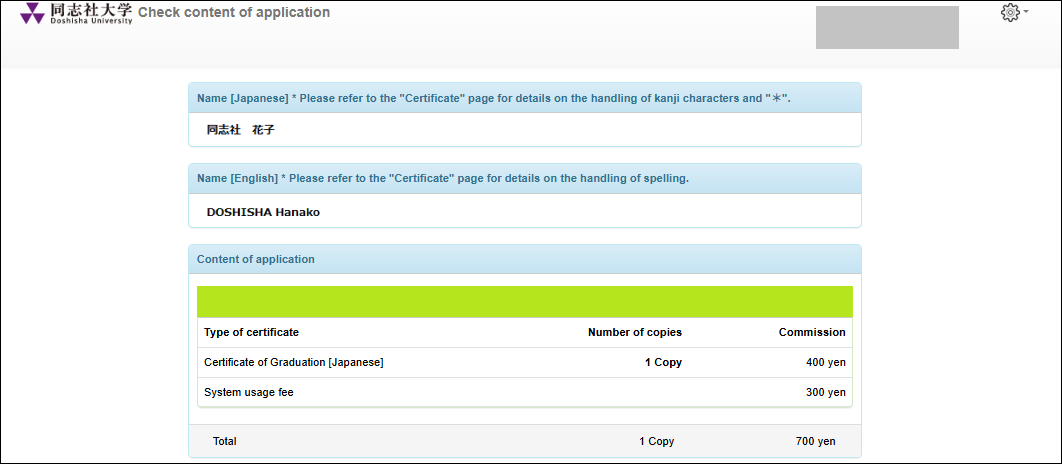
Regarding the Name on Japanese Certificates
The "name while enrolled" as recorded in the student registration/information system shall be printed on a certificate.
However, for individuals whose name contains kanji characters that are not supported by the system (hereinafter referred to as “non-standard characters” or "gaiji" ), the name shall be printed in katakana when a certificate is issued at convenience stores, via an on-campus machines, or via online system. The relevant applicant who wishes to have their name printed in kanji characters must submit the application for issuance at the counter or by postal mail, using the following methods.
●Current Students
・If you want a certificate to be issued at the counter
After logging into the Certificate Issuance Service, select "Issuance via On-campus Machines (Paper) and purchase a "Certificate Application Form." Complete the printed form with the required information and submit it to the office counter of your faculty or graduate school.
※An application for a certificate submitted at the
counter cannot be handled via postal mail. The certificate shall be collected
only at the counter.
・If you want a certificate to be issued via postal mail
After logging into the Certificate Issuance Service, select
"Issuance via Postal Mail (Paper)" and submit the application after
selecting the certificate you want to be issued.
※If you select issuance via postal mail, certificates
cannot be collected at the counter.
●Former Students (graduates, completers, withdrawal, expelled students, etc)
When submitting the application to use the Certificate Issuance Service,
there is an option to select "Request for Certificate Issuance Using Characters Not Supported by the system," so please select "Yes."
※Issuance is only available via postal mail and at the counter. Please note that even when "request issuance with characters that cannot be entered in the system" is selected, your name will be printed in katakana if a certificate is issued at convenience stores, via on-campus machines , or via online system.
・If you want a certificate to be issued at the counter
After logging into the Certificate Issuance Service, select "Issuance via On-campus Machines (Paper) and purchase a "Certificate Application Form." Complete the printed form with the required information and submit it to the office counter of your faculty or graduate school.
※An application for a certificate submitted at the counter cannot be handled via postal mail. The certificate shall be collected only at the counter.
・If you want a certificate to be issued via postal mail
After logging into the Certificate Issuance Service, select "Issuance via Postal Mail (Paper)" and submit the application after selecting the certificate you want to be issued.
※If you select issuance via postal mail, certificates cannot be collected at the counter.
Please note that when the system managing student enrollment records at this university was renewed in the 2017 academic year, the character encoding used by the system was changed. Consequently, certain kanji characters have been converted to equivalent or substitute characters. If the names of students who graduated or withdrew by the 2016 academic year contain any of these kanji, they are managed using the converted kanji listed in the table below. We appreciate your understanding in advance.
Converted Kanji List ※Japanese version only
Regarding the Name on English Certificates
The spelling of names in English letters shall, in principle, follow the Hepburn romanization system(※1).
Names shall be written in the order “last name - first name,” with the “last name” in all uppercase letters and the “first name” with only the first letter capitalized, the rest in lowercase (※2).
※1 This does not apply if a correction was made during enrollment at this university to ensure the name matches the spelling on the passport due to foreign-origin names, etc.
※2 If a middle name is present, the order shall be “Last Name-First Name-Middle Name.” The “Last Name” shall be written entirely in uppercase letters, while the “First Name” and “Middle Name” shall have only the first letter capitalized, with the rest in lowercase letters.
Regarding Name Changes for Former Students (Graduates, Completers, Withdrawn Students, Expelled Students, etc)
Regarding Name Changes due to Legal Name Changes or Use of a Common Name for Former Students (graduates, completers, withdrawal, expelled students, etc)
Changes of name due to legal name changes or the use of a common name for former students shall not be made. A Certificate shall be issued with the name while enrolled. If your name has been legally changed after leaving the university, please handle it by submitting a copy of your extract of the family register (“koseki shohon” in Japanese) along with the certificate to the recipient. However, if there are any special circumstances regarding name changes, please consult the office of the faculty or graduate school to which you belonged.
Regarding Changes to the Name Notation for Former Students (graduates, completers, withdrawal, expelled students, etc)
After reviewing the application details screen for the certificate issuance service (sample screenhere), we will change the name notation if any of the following apply.If you wish to make a change, first consult with the administrative office of the faculty or graduate school to which you belonged regarding your desire to make the change. Then, fill out the “Name Change Application Form” and submit it to the faculty or graduate school administrative office.
※If you have multiple enrollment histories at this university, the change will be applied to all your student records.
●When requesting replacement of kanji characters not supported by the system with alternative characters (※1) (※2)
●When contracted sounds or geminated consonants are not written as small characters, or when the English name differs due to contracted sounds or geminated consonants not being written as small characters
(Example) Hattori Tetsuhei: Hatsutori Tetsupei → HATTORI Teppei
●When the order of the English name differs from the university's prescribed rules (※3)
(Example) [×: First Name - Last Name - Middle Name]: JOHN Smith Michael→[ ○: Last Name - First Name - Middle Name]: SMITH John Michael
●When the English name uses a spelling other than Hepburn romanization (※3)
(Example) アリス: Arisu → Alice
※1 For kanji characters not supported by the system (non-standard characters), please check here.
※2 When entering non-standard characters on the “Name Change Application Form”, either attach an image file of the relevant kanji or print the form and fill it in by hand.
※3 Along with the “Name Change Application Form”, please submit a copy of your passport or residence card containing the correct information to your faculty/graduate school office.
Regarding Application for Certificate Issuance Service
Regarding Application for Certificate Issuance Service When Multiple Enrollment Records Exist at Doshisha University
(Example)
・If an individual who graduated from the undergraduate program in the 2010 academic year and completed the master's program in the 2012 academic year applies to use the certificate issuance service for the purpose of obtaining a master's program transcript
⇒ Please apply using your master's program enrollment information.
・If an individual who graduated from an undergraduate program in the 2021 academic year and completed a master's program in the 2023 academic year applies to use the certificate issuance service for the purpose of issuing an undergraduate graduation certificate
⇒ Please apply using your undergraduate student status information.
- Q
- I have an unlinked student ID (one not displayed on the application screen). How should I handle this?
- A
- If the following conditions apply, the link will not be established automatically. In this case, if you wish to apply for a certificate related to a different student ID, you must manually add the student ID number yourself. For details, please refer to the operation manual from the page after logging into the service.
<Students Not Eligible for Linking>
・Students awarded a degree classified as “Otsu/By doctral dissertation without coursework”
<Students Likely Not Eligible for Linking>
・Undergraduate, Second Division: Students enrolled in or before the 1988 academic year
・Graduate School (Master's Program): Students enrolled in or before the 1990 academic year
・Graduate School (Doctoral Program): Students enrolled in or before the 1989 academic year
※Students enrolled beyond the standard period of study may be eligible for linking.
Regarding Application for Certificate Issuance Service for Students Awarded Doctoral Degree (乙/Otsu)
- Q
- I was awarded a doctoral degree(乙/Otsu ) from Doshisha University. I would like to apply for the Certificate Issuance Service to obtain my Doctoral Degree Certificate. How should I proceed with the application?
- A
- Please click the “For Former Students” button on the “Service Login Page” of this page and complete the new registration process.On the application screen, you must enter information from your enrollment period. For “Name of University (required)” select “Doctoral Degree Program” For “Name of despartment (Required)” and “Name of course (Required),” enter the name corresponding to the degree awarded. For “Date of leaving University (Required),” enter the date the degree was conferred, and select “Degree Conferral (Otsu/By doctral dissertation without coursework )” from the options.
Please note that the list of doctoral degree recipients can be found below for your reference.
Doctoral Dissertations (List of Doctoral Degree Recipients) ※Japanese version only
Regarding Application for Certificate Issuance Service for Students Awarded Doctoral Degree (甲/Ko) Within Three Years of Withdrawal
- Q
- After withdrawing from the doctoral program at Doshisha University,doctoral degree (甲/Ko ) from Doshisha University within three years. I wish to apply for the Certificate Issuance Service to obtain a Doctoral Degree Certificate. How should I proceed with the application?
- A
- Please apply using the information from when you were enrolled in the doctoral program at Doshisha University.
Regarding Issuance of Certificates Upon Graduation/Completion
Certificates Issued Free of Charge Upon Graduation/Completion
Certificates Issued Free of Charge Upon Graduation/Completion
- Certificate of Graduation / Degree Conferment
- Official Transcript
- Certificate of Completion of Minor (Only for students who completed the required credits)
- Certificate of Completion of Educational Program (Only for students who completed the required credits)
At the time of graduation/completion, the following certificates can be issued free of charge, one copy each in Japanese and English, through the Certificate Issuance Service.
* Additional certificates may be issued by certain faculties or graduate schools.
* For students whose Name (Kanji) includes an asterisk (*), the certificates in Japanese marked [For Free] will display the Name (Katakana). If you require a certificate with your Name (Kanji) included, please contact the office of your faculty or graduate school in advance. (An additional issuance fee will be required.)
Procedures Required for Free Issuance
Procedures Required for Free Issuance
Steps Required Before the Graduation/Completion Date
- Log in to the Certificate Issuance Service as a “Current Student” using your University’s UserID.
- From the notification screen displayed upon login, or by clicking the gear icon at the top right of the application home page, go to “Apply for additional graduate account”.
- Enter the email address you will use after graduation/completion and update your registered email address.
* Please register a personal email address, not the one provided by the university. - Select “New” as the application type, enter your current address and other required information, then click the “Application” button.
- Check the “First-time Password” sent to the email address you entered and set your “Password” and “Second Password”.
Steps Starting the Day After the Graduation/Completion Date
- Log in to the Certificate Issuance Service as a “Former Student” using the email address and passwords you registered in advance.
- Choose your preferred issuance method from the following options: “Issuance at Convenience Stores (Paper)”, “Issuance via On-campus Machines (Paper)” or “Issuance via Online System (PDF)”.
* If you select “Issuance at Convenience Stores”, an additional printing fee of 60 JPY per page will apply.
* If you select “Issuance via On-campus Machines”, please be aware of the machine’s operating hours. - For certificates marked [For Free], select the desired number of copies and submit your application.
- Follow the instructions on the screen or in the email to complete the certificate issuance process.
Frequently Asked Questions
- Q
- When can I go to “Apply for additional graduate account”?
- A
- You will be able to apply from mid‑April of the academic year in which you are in the final year of the standard program duration (for Law School, uniformly the second year).
- Q
- When is “the Graduation/Completion Date”?
- A
- The graduation/completion date is stated on the grade report issued at the end of the graduation/completion term. For students graduating/completing at the end of the Spring Semester (September graduation/completion), the date is the last day of the semester. For students graduating/completing at the end of the Fall Semester (March graduation/completion), the date is the day of the Commencement Ceremony.
- Q
- What should I do when the “Apply for Additional Graduate Account” menu is not displayed?
- A
-
If the menu does not appear even within the period mentioned above, it is possible that you have already completed the application in the past.
If you are able to log in through the Login Page for “Former Students”, then your “Apply for additional graduate account” process has already been completed.
Please try logging in from the Login Page for Former Students. If you do not remember your email address, password or second password, please try resetting your password via “If you have forgotten your password” on the Login Page for Former Students, and then attempt to log in again.
- Q
- Is the “New Registration Procedure” for former students required even though I have completed the “Apply for Additional Graduate Account” process?
- A
- Those who complete the “Apply for Additional Graduate Account” process by the graduation/completion date are not required to complete the “New Registration Procedure” for former students, even after graduation or completion. Please log in using the email address and passwords you registered when submitting the application for additional graduate account.
- Q
- What should I do if I have completed the “Apply for Additional Graduate Account” process but am still unable to log in from the login page for former students?
- A
- Please try resetting your password via “If you have forgotten your password” on the Login Page for Former Students, and then attempt to log in again.
- Q
- What should I do if I need more than one copy of my certificate at the time of graduation/completion?
- A
- Please log in to the Certificate Issuance Service as a “Former Student” from the day after your graduation/completion date, and apply for the certificates you need in the same way as for Free Issuance. For details including certificate issuance fees and system usage fees, please refer to the “Certificates” page.
- Q
- What should I do if I was unable to submit the “Apply for Additional Graduate Account” request by the graduation/completion date?
- A
-
If you were unable to submit the “Apply for additional graduate account” request by the graduation/completion date for unavoidable reasons, please complete the “New Registration Procedure” from the lower section of the login page for “Former Students”.
In principle, your application will be processed within three days (excluding office closure days) from the day following the day of the application. Please note that processing times may be longer than usual due to high application volume at the end of each semester, and your certificate(s) may not be issued in time when you need them.
If you are a current student, please make sure to submit the “Apply for additional graduate account” request via the login page for “Current Students” by the graduation/completion date.
- Q
- How long will the User ID remain valid?
- A
-
Please check the news on the original website of the IT Support Office below.
“ユーザIDの利用期限と2026年度の利用について” (Japanese version only. We apologize for the inconvenience.)
As long as your User ID remains valid, you will be able to log in from the login page for “Current Students”.
However, starting around 7:30 a.m. on the day following your graduation/completion date, you will be treated as a “Former Student” within that service, and you will no longer be able to submit the “Apply for additional graduate account” request. To ensure that you can continue to use the certificate issuance service even after your User ID has expired, current students must submit the “Apply for additional graduate account” request via the login page for “Current Students” by the graduation/completion date.
Note: If you have multiple enrollment histories, the system will automatically link them during the administrator's (the university's) approval of your application. This will allow you to apply for certificates related to other academic records as well.